
When is viewWillAppear, viewDidAppear, viewDidLoad, viewWillDisappear actually called

A few months ago I decided to apply for a job at a software company, I interviewed for IOS developer position. After a week I got a result they  gave me an offer 400$ per months, salary not too high, not too low for me 
I also  struggled with a lot of questions from my interviewer, so today in this article I will share with you my experiment to answer the question from the interviewer 
if you are  IOS developer you are familiar with  viewWillAppear, viewDidAppear, viewDidLoad, viewWillDisappear, and viewDidDisappear 
let me ask you a question what is the running order of viewDidAppear, viewDidLoad, viewWillDisappear, and viewDidDisappear.This question sounds easy it’s straightforward. Actually, it very hard to answer, because when you make app maybe you don't care about it, No one tells you before you get an interview,  now we need to create a new project, inside of ViewController.swift  we need to implement some methods look like this 
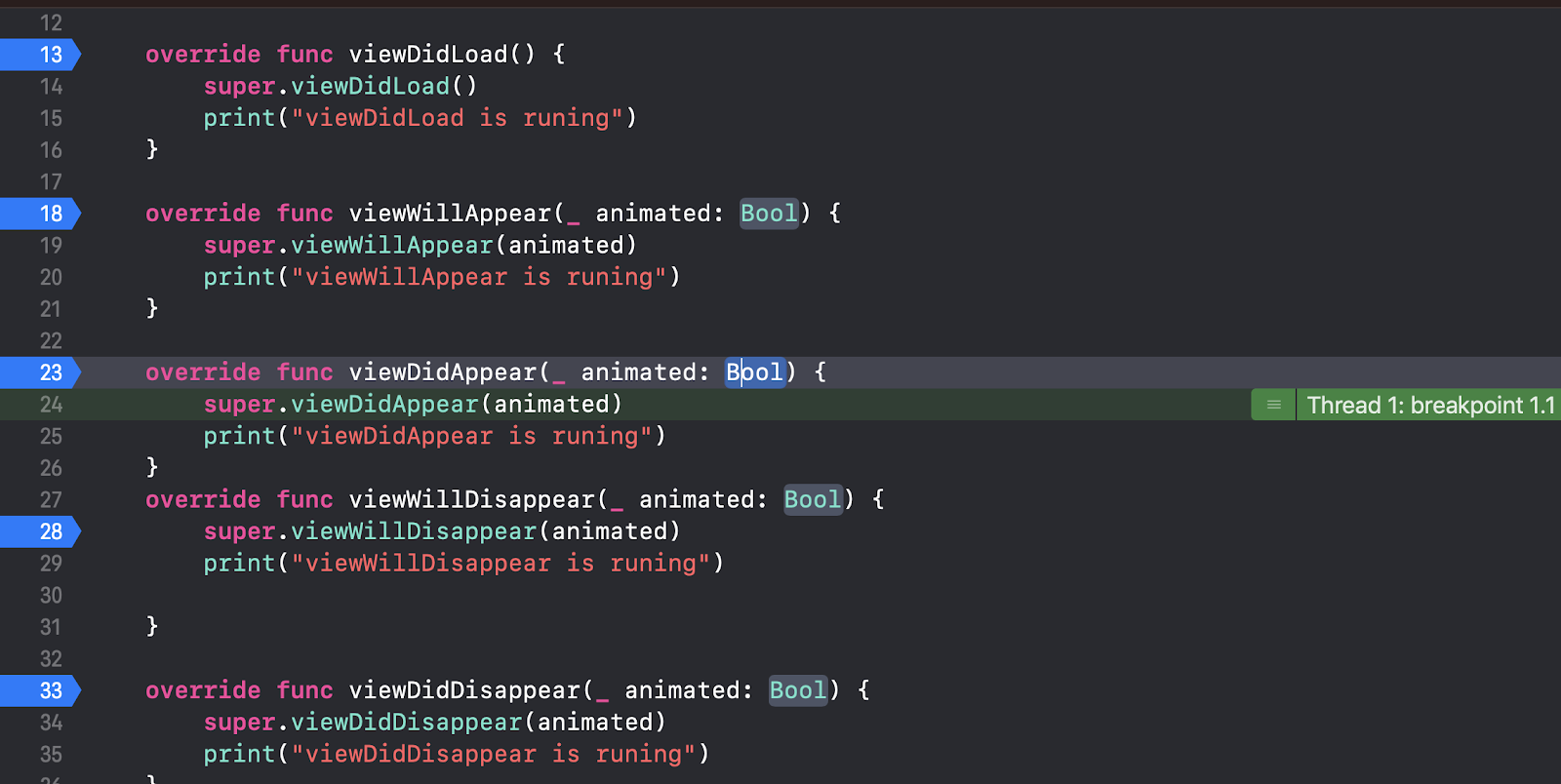
After that, we need to hit command+R to run our  project and, I also put some breakpoint in order to see what going on


As you can see  the running order is 
1 viewDidLoad
2 viewWillApear
3 viewDidApear
4 viewWillDidDisappear
5 viewDidDisappear

Summarize
1 viewDidLoad: is called when only when the controller loads the view, viewDidLoad only do a thing once, you should do things that you only have to do once in viewDidLoad – like setting your UILabel texts.
2 viewWillApear: is called before the view is added, This happens always after viewDidLoad and is called every time the view is displayed.
3 viewDidApear: is  called after the view is added 
4viewWillDidDisappear: is called  before the view is removed 
5 viewDidDisappear: is called after the view is removed 

I hope this useful for you before you get an interview, please leave your comment below this article 


Comments

Popular posts from this blog

Build Carousel Effect in iOS with Swift Kien Pham

This tutorial I’m going to show you how to build Carousel effect it is the most common, you can see it everywhere you can see it on Instagram or App Store which is beautiful UI you can use a lot of in your app many places  that you want to show beautiful text and beautiful image view First thing first we need to create a new project and select iOS->SingleView Application Product Name: Tableview – this the name of your project ·      Company Identifier: KienPhamDev It’s actually the domain name written the other way round. if  you have a domain, you can use your own domain name otherwise you may use mine or just fill in ·      Device family: you can choose universal it’s not important ·      Choose swift as Language And then we are going to the main storyboard , in this tutorial we want to use ViewController so we just need to drag a new Collection View from Object library ...

How to update two images using GCD in swift

If you are IOS developer you can run into a problem when your app download a lot of image from URL maybe your app is crashed or you can't interact with the rest of the application, when I interviewed for a job  a few months ago, I also got this question from my interviewer   He assumed that there are 3 images from URL when user click on the update button all of them will be updated at  the same time so let’s do it a demo to know what happens when your application run without multithreading    Inside of my project I need  some element into ViewController,  As you can see we have 2 images and a button to update our image  Inside of ViewController , we need to hook up all of them with  @IBOutlet and @IBAction it should look like this  As you can see when user click on the update button to download two images from URL, you can't interact with the rest of the application you can’t d...